Legacy Engineering Note · 기존 기술 블로그에서 선별 이관한 기록입니다. 작성 당시 환경과 버전을 기준으로 합니다.
VSCODE 실행 후 명령어 팔레트 실행
VS code에서 명령어 팔레트(Command Palette)의 단축키 : Ctrl + Shift + P
팔레트를 이용한 로그인
>Azure:Sign In
계정 선택
구독 확인
VSCODE에서 Azure Potal 접속
- VSCode에서 명령어 실행
Connect-AzAccount
- 계정 선택 및 로그인 진행
- 아래와 같이 연동작업
PS D:\GIT> Connect-AzAccount
경고: Unable to acquire token for tenant '4aed9820-113d-4f48-9f53-4d91f37ad279' with error 'SharedTokenCacheCredential authentication unavailable. Token acquisition
failed for user engineer@example.com. Ensure that you have authenticated with a developer tool that supports Azure single sign on.'

Account                   SubscriptionName TenantId                             Environment
-------                   ---------------- --------                             -----------
engineer@example.com kms-limited      xxxxxxxx-xxxx-xxxx-xxxx-xxxxxxxxxxxx AzureCloud
-
[AzurePotal] Azure Potal에 접속
1). 상단에 있는 Cloud Shell을 클릭하여
스토리지 생성2). 스토리지 만들기 클릭
3). Cloud Shell 진입
-
VSCODE에서 Azure Cloud Shell 클릭
-
상단에 구독 선택
-
VSCode에서 접속 성공한 모습
VSCode 연동작업 완료
Azure CLI 설치
Azure Login 실행
az login
tf main파일 생성 후 terraform plan 명령어 테스트
terraform init
terraform plan
Terraform 형상관리용 저장소 생성
- Azure CLI접속 후 해당 스토리지 계정에 접근
- 스토리지 관련 변수생성
REGION=koreacentral
STORAGEACCOUNTNAME=terraformkms20230221
CONTAINERNAME=tfcontainer
TFSTATE_RG=tfstate-rg
- 리소스 그룹 생성
az group create --name $TFSTATE_RG --location $REGION
- 생성된 리소스그룹 확인
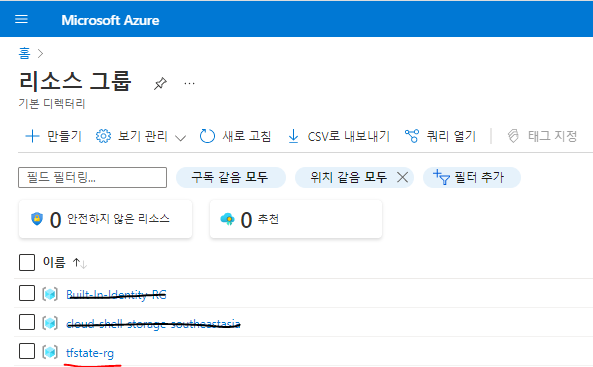
tfstate-rg 라는 name으로 생성된 리소스 그룹을 확인할 수 있다.
4. 스토리지 계정 생성
az storage account create -n $STORAGEACCOUNTNAME -g $TFSTATE_RG -l $REGION --sku Standard_LRS
- 결과화면 참조
```
blackcode230216 [ ~ ]$ az storage account create -n $STORAGEACCOUNTNAME -g $TFSTATE_RG -l $REGION --sku Standard_LRS
The public access to all blobs or containers in the storage account will be disallowed by default in the future, which means default value for --allow-blob-public-access is still null but will be equivalent to false.
{
"accessTier": "Hot",
"allowBlobPublicAccess": true,
"allowCrossTenantReplication": null,
"allowSharedKeyAccess": null,
"allowedCopyScope": null,
"azureFilesIdentityBasedAuthentication": null,
"blobRestoreStatus": null,
"creationTime": "2023-02-21T08:18:28.003306+00:00",
"customDomain": null,
"defaultToOAuthAuthentication": null,
"dnsEndpointType": null,
"enableHttpsTrafficOnly": true,
"enableNfsV3": null,
"encryption": {
    "encryptionIdentity": null,
    "keySource": "Microsoft.Storage",
    "keyVaultProperties": null,
    "requireInfrastructureEncryption": null,
    "services": {
    "blob": {
        "enabled": true,
        "keyType": "Account",
        "lastEnabledTime": "2023-02-21T08:18:28.065824+00:00"
    },
    "file": {
        "enabled": true,
        "keyType": "Account",
        "lastEnabledTime": "2023-02-21T08:18:28.065824+00:00"
    },
    "queue": null,
    "table": null
    }
},
"extendedLocation": null,
"failoverInProgress": null,
"geoReplicationStats": null,
"id": "/subscriptions/31b8d33f-e321-439a-b964-cdee7898eda5/resourceGroups/tfstate-rg/providers/Microsoft.Storage/storageAccounts/terraformkms20230221",
"identity": null,
"immutableStorageWithVersioning": null,
"isHnsEnabled": null,
"isLocalUserEnabled": null,
"isSftpEnabled": null,
"keyCreationTime": {
    "key1": "2023-02-21T08:18:28.065824+00:00",
    "key2": "2023-02-21T08:18:28.065824+00:00"
},
"keyPolicy": null,
"kind": "StorageV2",
"largeFileSharesState": null,
"lastGeoFailoverTime": null,
"location": "koreacentral",
"minimumTlsVersion": "TLS1_0",
"name": "terraformkms20230221",
"networkRuleSet": {
    "bypass": "AzureServices",
    "defaultAction": "Allow",
    "ipRules": [],
    "resourceAccessRules": null,
    "virtualNetworkRules": []
},
"primaryEndpoints": {
    "blob": "https://terraformkms20230221.blob.core.windows.net/",
    "dfs": "https://terraformkms20230221.dfs.core.windows.net/",
    "file": "https://terraformkms20230221.file.core.windows.net/",
    "internetEndpoints": null,
    "microsoftEndpoints": null,
    "queue": "https://terraformkms20230221.queue.core.windows.net/",
    "table": "https://terraformkms20230221.table.core.windows.net/",
    "web": "https://terraformkms20230221.z12.web.core.windows.net/"
},
"primaryLocation": "koreacentral",
"privateEndpointConnections": [],
"provisioningState": "Succeeded",
"publicNetworkAccess": null,
"resourceGroup": "tfstate-rg",
"routingPreference": null,
"sasPolicy": null,
"secondaryEndpoints": null,
"secondaryLocation": null,
"sku": {
    "name": "Standard_LRS",
    "tier": "Standard"
},
"statusOfPrimary": "available",
"statusOfSecondary": null,
"storageAccountSkuConversionStatus": null,
"tags": {},
"type": "Microsoft.Storage/storageAccounts"
}
```

- 스토리지계정 중복시 나타나는 에러
```
blackcode230216 [ ~ ]$ az storage account create -n $STORAGEACCOUNTNAME -g $TFSTATE_RG -l $REGION --sku Standard_LRS
The public access to all blobs or containers in the storage account will be disallowed by default in the future, which means default value for --allow-blob-public-access is still null but will be equivalent to false.
(StorageAccountAlreadyTaken) The storage account named terraformkms is already taken.
Code: StorageAccountAlreadyTaken
Message: The storage account named terraformkms is already taken.
```
생성된 스토리지 계정을 확인할 수 있다.
- 컨테이너 생성
az storage container-rm create --storage-account $STORAGEACCOUNTNAME --name $CONTAINERNAME
- 명령어 실행 화면
```
blackcode230216 [ ~ ]$ az storage container-rm create --storage-account $STORAGEACCOUNTNAME --name $CONTAINERNAME
{
"defaultEncryptionScope": null,
"deleted": null,
"deletedTime": null,
"denyEncryptionScopeOverride": null,
"enableNfsV3AllSquash": null,
"enableNfsV3RootSquash": null,
"etag": null,
"hasImmutabilityPolicy": null,
"hasLegalHold": null,
"id": "/subscriptions/31b8d33f-e321-439a-b964-cdee7898eda5/resourceGroups/tfstate-rg/providers/Microsoft.Storage/storageAccounts/terraformkms20230221/blobServices/default/containers/tfcontainer",
"immutabilityPolicy": null,
"immutableStorageWithVersioning": null,
"lastModifiedTime": null,
"leaseDuration": null,
"leaseState": null,
"leaseStatus": null,
"legalHold": null,
"metadata": null,
"name": "tfcontainer",
"publicAccess": null,
"remainingRetentionDays": null,
"resourceGroup": "tfstate-rg",
"type": "Microsoft.Storage/storageAccounts/blobServices/containers",
"version": null
}
```
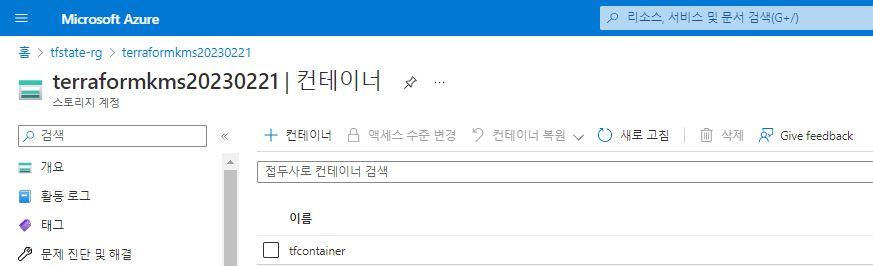
```
컨테이너명 : tfcontainer
생성된 컨테이너 확인
```
6. 스토리지 계정 액세스키 확인
- 선행 명령구문 입력
ACCOUNT_KEY=$(az storage account keys list --resource-group $TFSTATE_RG --account-name $STORAGEACCOUNTNAME --query '[0].value' -o tsv)
- 출력된 엑세스키 확인
echo $ACCOUNT_KEY
- 명령어 실행 결과
```
blackcode230216 [ ~ ]$ ACCOUNT_KEY=$(az storage account keys list --resource-group $TFSTATE_RG --account-name $STORAGEACCOUNTNAME --query '[0].value' -o tsv)
blackcode230216 [ ~ ]$ echo $ACCOUNT_KEY
kiWG0R7v0m1KI+LknZSDoU8uOQxxhfruSLqbXToqj9U7hk+m9PQY42hW2BXH2X1JQPMeQ/FyJlUa+AStwbuVaQ==
```